Folder Block Updater for AutoCAD (MCP)
Ask your AI (Claude Desktop and others) to bring the blocks in every drawing in a folder up to date from your block library drawing. It can also replace one block with another in all of them at once.
¥980per month · cancel any time
Download free (list and preview are free, no card)Renews monthly; cancel any time. Within 14 days of your first payment, write to us for a full refund. The price is set in Japanese yen, and the payment page shows the final amount, with any tax for your country, before you pay. Payment is handled on Stripe's page. Works with the AI you already use. By subscribing you agree to the terms of use (Japanese).
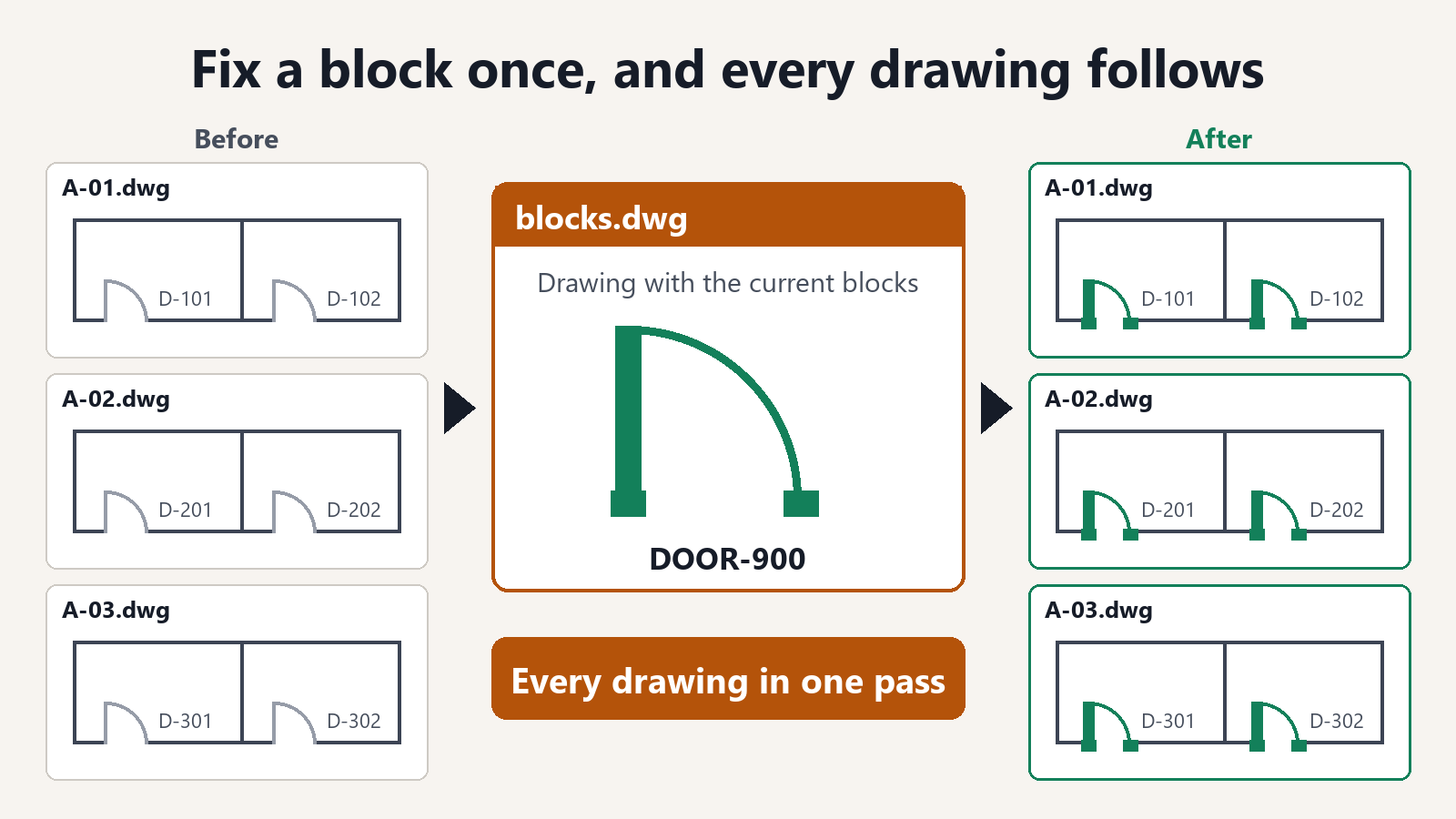
Fix a block once, and every drawing follows
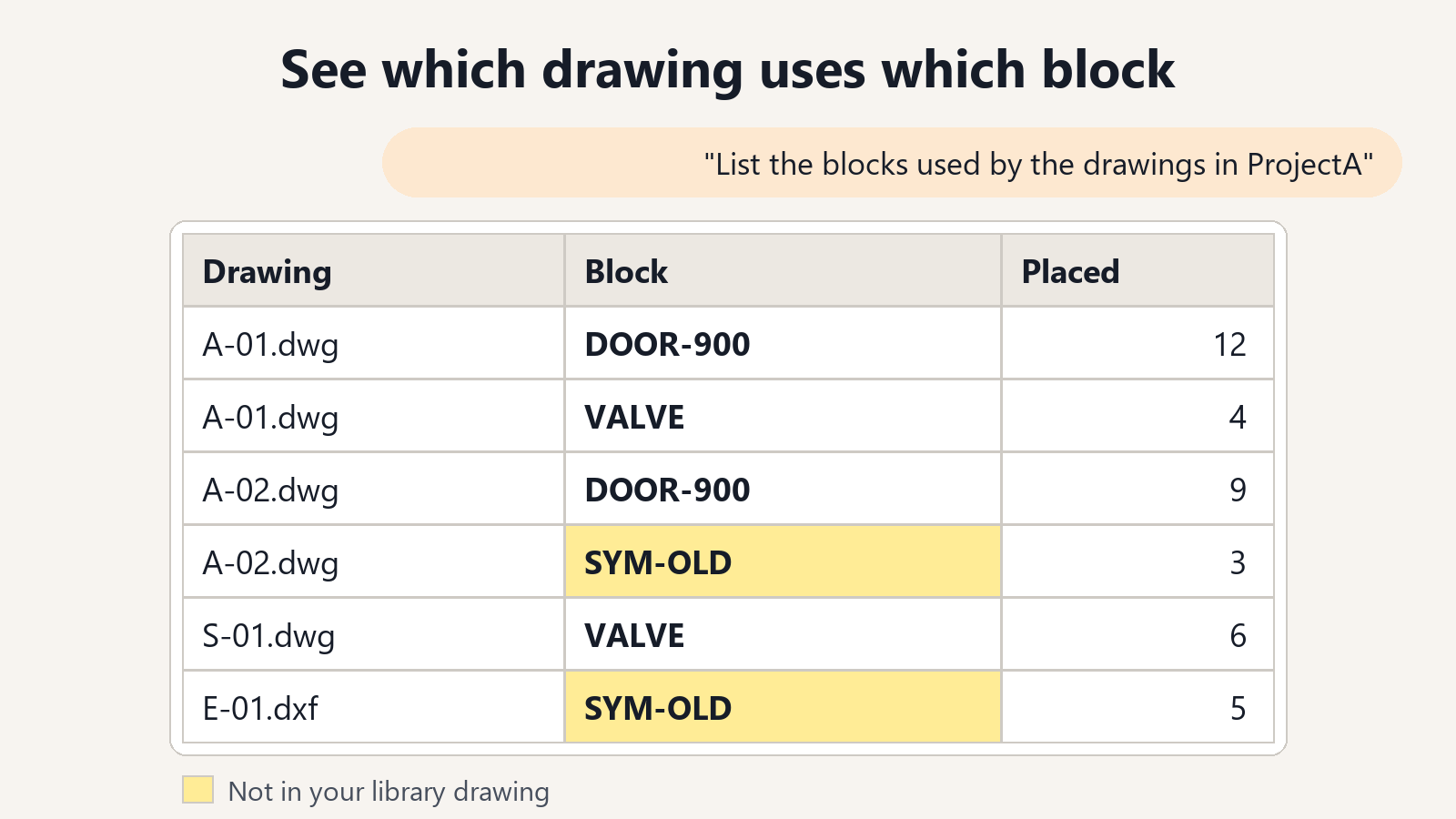
See which drawing uses which block
The DWG and DXF files in a folder are read, and for each drawing you get the block names and how many times each one is placed. Drawings that still hold an old block are easy to spot.
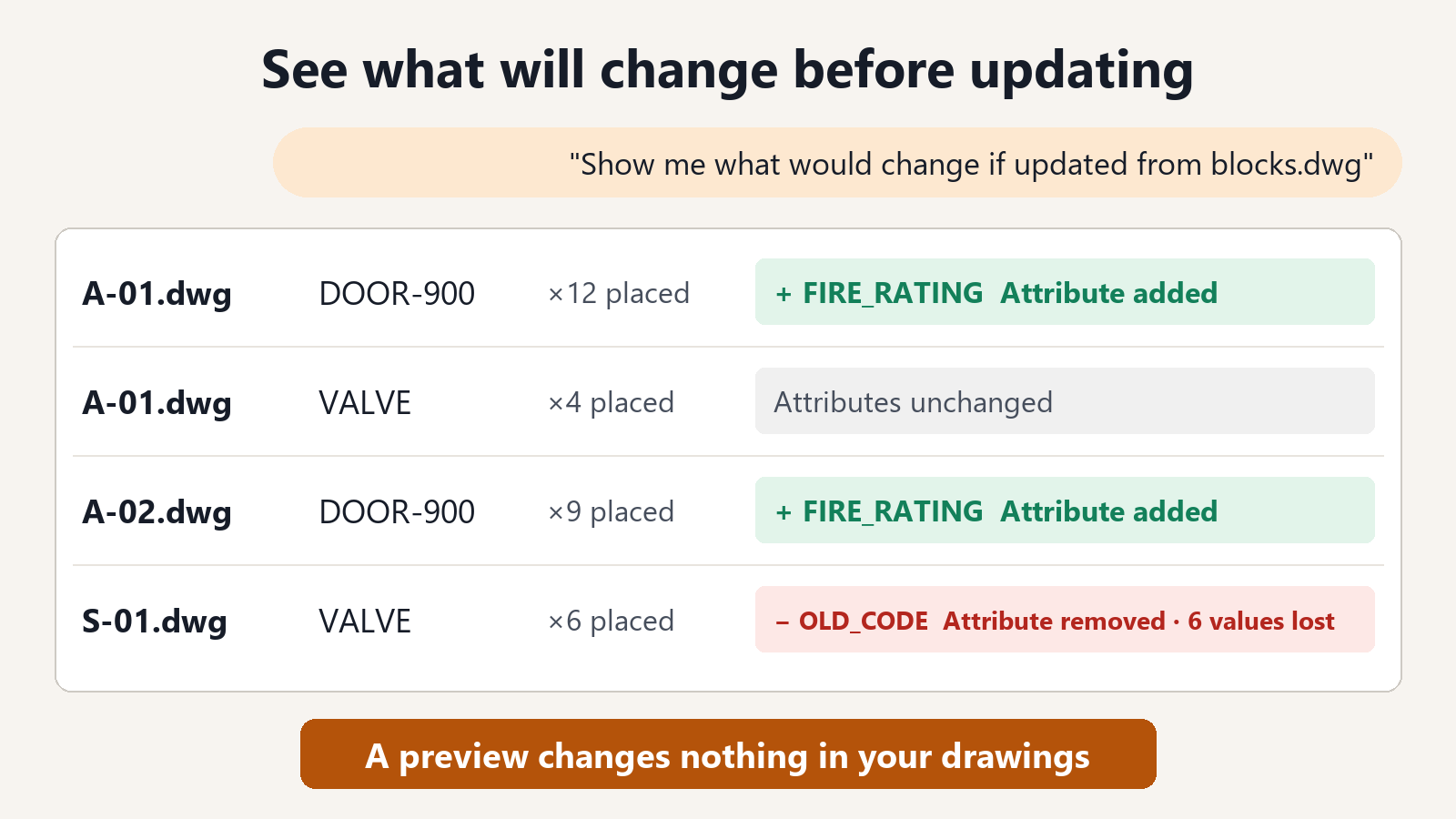
See what will change before updating
For each drawing you see the blocks that would be updated and how many times each is placed. When the attributes differ, you also see the attributes added, the attributes removed and the number of values that would be lost.
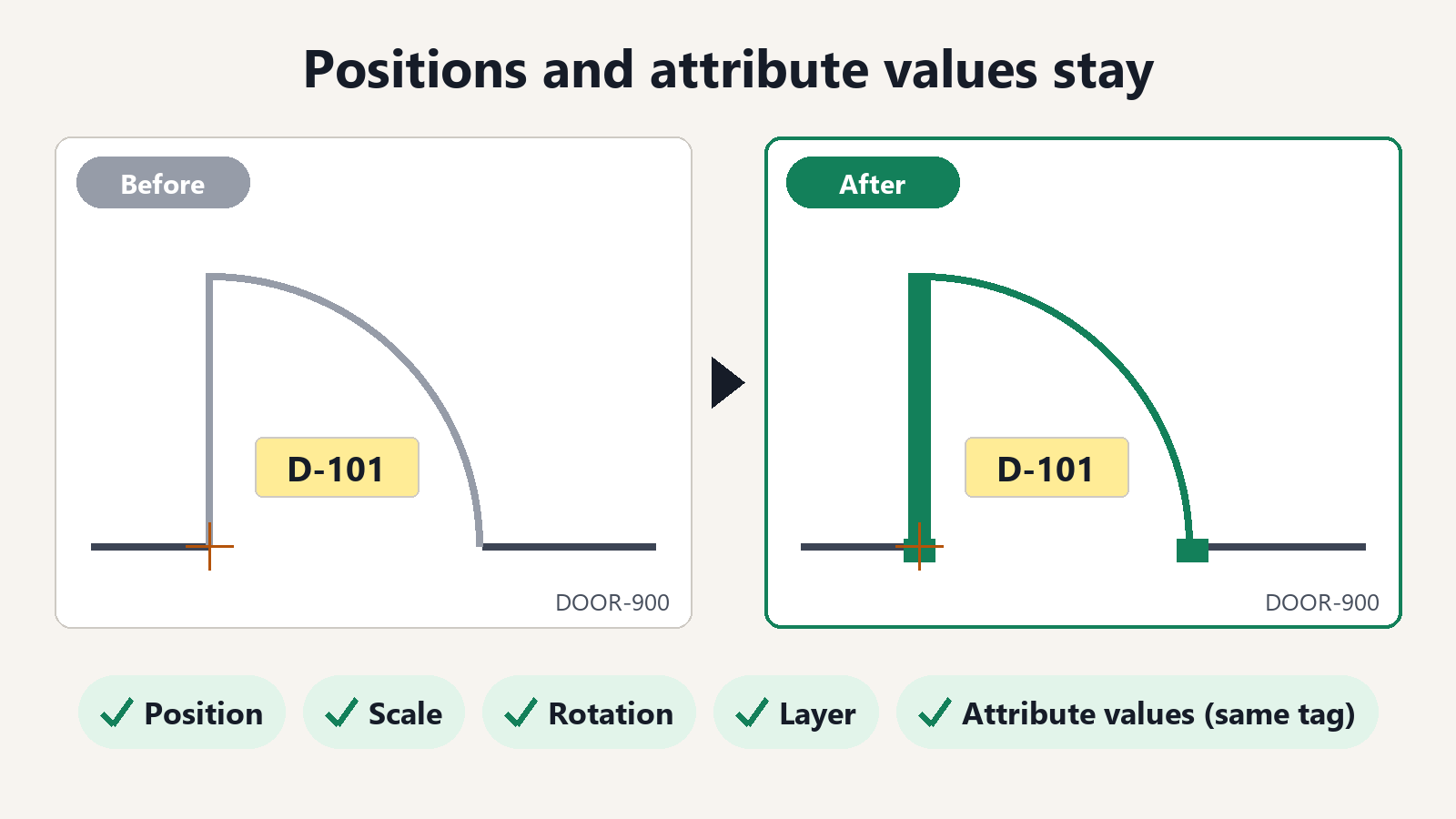
Positions and attribute values stay
Every placed block keeps its position, scale, rotation and layer, and the attribute values with the same tag. When the base point of a block has changed, the placed blocks are shifted so nothing moves on the sheet.
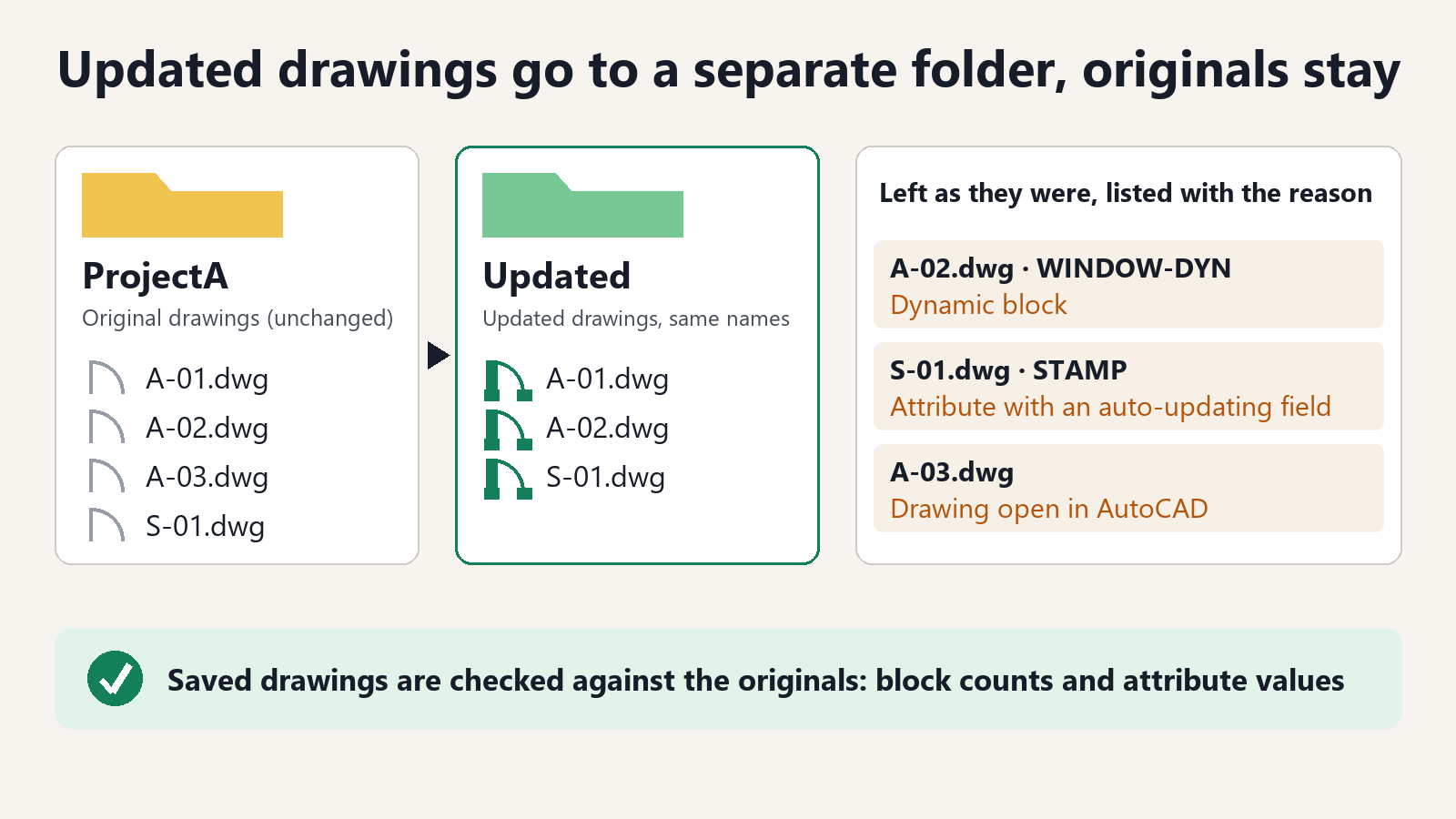
Updated drawings go to a separate folder
They are saved under the same names in another folder, and the originals stay as they are. Each saved drawing is checked against the drawing before the update: the number of placed blocks and the attribute values. Blocks left as they were come back as a list with the reason.
Free features and subscription
Free gives you the list of blocks and a preview of what would change. For ¥980 a month, the AI also updates the drawings and saves them.
Free
¥0no card
- Listing the blocks of the drawings in a folder
- Previewing what an update would change in each drawing
- Previewing what a replacement would change
Subscription
¥980per month
- Saving the drawings (DWG and DXF) with updated blocks
- Saving the drawings with a block replaced
- Everything in Free
- Cancel any time; refund within 14 days
Get started
- DownloadDownload the extension file. There is nothing to unzip.
- Add it to Claude DesktopIn Claude Desktop, open Settings, then Extensions. Drag the downloaded file onto that page and press Install. There is no settings file to edit.
- Ask for the listAsk your AI, "List the blocks used by the drawings in C:\Drawings\ProjectA." For DWG files, keep AutoCAD running.
Using another AI client? Download the zip and follow README.txt in it to add the tool to your MCP settings.
After you subscribe, the purchase-complete page shows your license key. Tell your AI, "My license key is blkcad_...... Please register it." and saving the updated drawings is ready to use.
What to ask
- "List the blocks used by the drawings in C:\Drawings\ProjectA."
- "Show me what would change if the blocks in C:\Drawings\ProjectA are updated from C:\Standards\blocks.dwg."
- "Update them, and save the drawings to a folder called Updated."
- "Update only the blocks DOOR-900 and VALVE."
- "Replace the block SYM-OLD with SYM-NEW."
FAQ
How do I update a block in many drawings at once?
Keep one drawing with the current blocks (your block library drawing). Ask your AI, "Show me what would change if the blocks in C:\Drawings\ProjectA are updated from C:\Standards\blocks.dwg", check the list, then ask, "Update them, and save the drawings to a folder called Updated." The updated drawings are saved under the same names in a separate folder, and the original drawings are not changed. Saving the updated drawings is part of the subscription.
How do I replace one block with another in every drawing?
Ask your AI, "In ProjectA replace the block SYM-OLD with SYM-NEW from blocks.dwg, and save the drawings to a folder called Updated." Position, scale, rotation and layer of every placed block stay the same, and attribute values with the same tag are carried over.
I redefined a block. Why did the other drawings not change?
A block definition is stored inside each drawing, so fixing it in one drawing leaves the others as they were. This tool puts the current definition from your library drawing into every drawing in the folder in one go.
Are attribute values lost when a block is updated?
Attribute values with the same tag are kept. When the new block has other attributes than the old one, you see for each drawing which attributes would be added, which would be removed and how many values would be lost, before anything is updated.
The base point of my block changed. Will the blocks move?
When the new block has a different base point, the placed blocks are shifted by that amount so nothing moves on the sheet.
What happens to dynamic blocks?
Dynamic blocks, and blocks whose attributes hold a field that updates by itself, are left as they are and listed for each drawing with the reason.
Is the content of my drawings sent anywhere?
The drawing files are read on your PC, and this tool does not send them anywhere. The subscription check sends only the license key. Your AI receives the results of what you ask for, such as file names and block names.
Which AI can I use? Is the AI fee included?
Any AI app that supports MCP (the common way AI apps use outside tools), such as Claude Desktop. You keep using the AI you have now. The price of this tool does not include AI usage fees.
Does it work with AutoCAD LT?
DWG drawings need AutoCAD for Windows (not LT). With AutoCAD LT, you can list, preview and update DXF files, which works without AutoCAD. Try the free list and preview first.
Can I cancel the subscription any time?
Yes. Ask your AI "I want to manage my subscription" and it gives you the link to the Stripe page for cancelling, changing the card and receipts. If you cannot use the AI, write to contact@gramshift.com from the email address on your receipt and we will cancel it. After cancelling, you can use it until the end of the month you paid for. Within 14 days of your first payment, write to us for a refund.
What you need
- Windows 10 / 11
- An AI client that supports MCP (such as Claude Desktop)
- DWG drawings: AutoCAD for Windows (not LT), kept running
- DXF drawings: works without AutoCAD
- A drawing that holds the current blocks (.dwg for DWG drawings, .dxf for DXF drawings)
- An internet connection for the subscription check
Good to know
- Subfolders are not read. Up to 500 drawings per run.
- Drawings open in AutoCAD are skipped and listed.
- Blocks placed in model space, in layouts and inside other blocks are updated.
- Nested blocks and layers that the new block needs are brought into the drawing with it.
- Drawings with nothing to change are not saved, and files already in the target folder are not overwritten.
If something does not work, or you lost your key, write to contact